

Industry vocabulary, in context
SpeechText.AI offers specialist models for finance, medicine, law and other fields. Choose from the models available for your language to give professional terminology more context than a general-purpose setting.
SpeechText.AI turns Kannada audio and video into editable Kannada text. Choose available industry models, review speaker-labelled transcripts and export documents or subtitles from one browser workspace.
Free to try. Paid plans from US$9/month with 240 transcription minutes.
Customer logos from SpeechText.AI's wider transcription service.




Upload from your account, select Kannada and give the engine the right context. Let AI produce the first draft. Keep the final review in your hands.
Choose your Kannada recording from your device. Use the original file, with clear, audible speech and as little background noise as possible.
MP3 · WAV · M4A · MP4Set Kannada as the spoken language. Choose the available recording-type and industry options that match your interview, lecture, meeting or call.
Language · Audio type · SubjectSpeech recognition converts the recording into Kannada text with punctuation. Use speaker identification to separate contributions in a conversation.
Speech recognition · Speaker turnsListen back, correct names and check important figures. Download a document for your team or a subtitle file for your video.
DOCX · PDF · SRT · VTT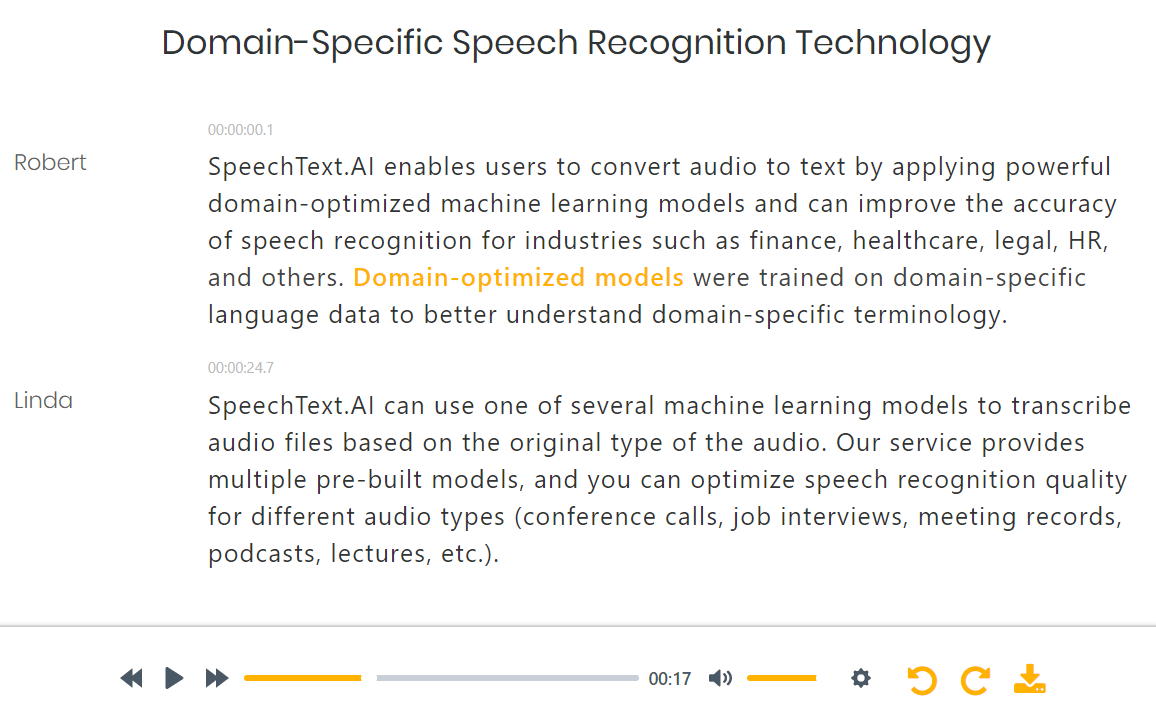
Need one line from a long interview? Start with the transcript, then check the recording before you quote it. The browser editor keeps your audio and text in the same workspace, so an unfamiliar name or a fast-spoken number doesn't have to become a guessing exercise.
A live dictation tool handles the moment you speak. SpeechText.AI works with recordings you already have, combining context settings, speaker labels, review tools and useful exports.
SpeechText.AI offers specialist models for finance, medicine, law and other fields. Choose from the models available for your language to give professional terminology more context than a general-purpose setting.

A classroom lecture isn't a conference call. Select the available interview, lecture, meeting or call settings to match how your audio was recorded.

Speaker identification, also called diarization, marks changes of voice. Use it for Kannada interviews and meetings, then check labels where people interrupt or speak together.

Read Kannada script, listen to the audio and correct names or technical terms in your browser. Automatic punctuation gives you a readable starting point, not a wall of words.

Download Word documents or PDFs for written records, and SRT or VTT files for captions. Your transcript stays useful outside the editor.

Keep Kannada recordings and projects in other supported languages in one account. Choose the spoken language for each file, whether you're working locally or across international teams.
Industry-model and recording-type choices depend on the selected language. Use the options shown for Kannada in your account.
Building a file-processing workflow? Explore the SpeechText.AI speech recognition API and check the current language and model options.
SpeechText.AI's advertised accuracy is up to 99%. That is a platform-level figure, not a Kannada-specific benchmark. Background noise, regional pronunciation and overlapping speech affect your transcript, so test the recording you actually plan to use.
Spoken Kannada often shares a sentence with English product names, abbreviations or technical terms. Regional pronunciation and colloquial phrasing add another layer. For a Bengaluru team call or an interview recorded in North Karnataka, listen closely to those transitions instead of assuming every word will follow formal written Kannada. Keep the speaker's meaning; correct recognition errors without rewriting the quote.
Start with a short, representative clip. Include a passage with names or specialist terms, compare the text with the audio, and check the settings before committing a larger project.
Choose a plan after testing your audioFor medical, legal or other high-stakes records, have a qualified person verify the transcript. AI output is not a certified record.
Uploads use a secure connection. SpeechText.AI processes recordings on EU-hosted infrastructure and gives you account controls for managing and deleting your files.
Personal data is processed in line with the EU General Data Protection Regulation.
SpeechText.AI's physical server infrastructure is located within the European Union.
The standard workflow does not require a staff member to listen to your recording and type it out manually.
Delete uploaded recordings and completed transcripts through your account dashboard.
Only upload recordings you have permission to process, and obtain participant consent where required. Read the Privacy Policy and Terms of Service. For retention, data residency or confidential-recording requirements, contact support@speechtext.ai before uploading.
Check a quote. Prepare study material. Share the words behind a video. A reviewed transcript gives a recording more than one use.
A journalist needs the exact wording. A student needs a passage they can revisit. A project team needs a reliable record of what was discussed, not a recollection assembled a week later.
Start with the full Kannada transcript. Check it against the recording, then reuse the verified text in your own notes, articles, reports or captions.
Working with mixed Kannada and English? Test a representative clip first. Pay particular attention to names, acronyms and technical terms before processing the rest of the project.
Turn Kannada interviews into speaker-separated text. Check place names, participant names and passages you plan to quote.
Convert recorded Kannada lectures into text you can revisit while preparing notes, reference material or handouts.
Keep a written record of the conversation. Review decisions, names and figures before drafting meeting minutes.
Prepare episode transcripts and source text for show notes or articles without retyping the whole conversation.
Convert spoken Kannada in presentations, webinars and video archives into editable text for your next document.
Export SRT or VTT captions. Review the words, timing and line breaks in your publishing workflow.
Start with 240 transcription minutes on a paid plan. For recurring interviews, classes or recording archives, higher-volume plans go up to 2,700 minutes.
A starting point for Kannada interviews, lectures, meetings and everyday audio files.
From$9USD / month
More transcription time for ongoing research, media production and team recording projects.
Plans with up to2,700transcription minutes
Check current trial allowances, plan features and upload limits in your account. Questions about Kannada settings or a larger project? Ask the SpeechText.AI support team.
Straight answers about Kannada script, mixed-language recordings, accuracy, subtitles, pricing and privacy.
Create an account or sign in, upload your audio or video and select Kannada as the spoken language. Choose the available recording-type and industry settings, then start transcription. Review names, numbers and speaker turns in the editor before exporting your document or subtitle file.
Kannada transcription produces editable text in Kannada script. It is not Kannada-to-English translation or Romanized Kannada typing. Check proper names and mixed-language words before you export.
For a mainly Kannada recording with English words, select Kannada and test a short, representative clip. Check English names, acronyms and technical terms in the transcript. Support for 50+ languages does not mean automatic language switching within a single file.
SpeechText.AI advertises up to 99% transcription accuracy at platform level. That figure is not a Kannada-specific benchmark or a guarantee for every file. Background noise, regional pronunciation, fast speech and overlapping speakers affect the result. Review important names, numbers and quotations against the recording.
Yes. Upload your video, select Kannada and review the transcript. Export an SRT or VTT file, then import it into your video editor or publishing platform. Keep the subtitle file in UTF-8 and check timing, line breaks and Kannada character display before publishing.
Use speaker identification to separate the conversation into speaker turns. Review the labels before assigning names, especially during interruptions. Automatic speaker labels distinguish voices; they do not verify a person's identity.
Yes. SpeechText.AI is free to try. Paid plans start at US$9 per month with 240 transcription minutes. Check the current trial allowance, plan features and upload limits in your account before starting a larger project.
Common upload formats include MP3, WAV, M4A and FLAC for audio, and MP4, MOV and WEBM for video. SpeechText.AI extracts the video's audio for transcription. Export reviewed transcripts as DOCX or PDF, or download SRT and VTT subtitles.
Files are transferred over a secure connection and processed on EU-hosted infrastructure. SpeechText.AI follows GDPR requirements. The standard transcription workflow is automated, and you can delete uploaded recordings and transcripts from your account. Read the Privacy Policy and contact support about retention or specific handling requirements before uploading confidential material.
SpeechText.AI offers a speech recognition API for adding transcription to apps and automated workflows. Confirm the current Kannada language and model options in the API documentation before building your integration.
Start with clear audio. Select Kannada, check the names and numbers, then download the document or subtitle file you need.