
Upload audio or video
Add your MP3, WAV, M4A, MP4, MOV or another supported file to your account. There is no need to extract a video's audio yourself.
Telugu audio & video transcription
Online Telugu AI transcription service. Upload audio or video, choose the recording type and available industry models, then edit Telugu text and export documents or subtitles.
Try your own recording first. Paid plans start at US$9/month with 240 transcription minutes.
Drop a file here, or click to select one.
Selection preview only. Upload and transcription start in your account.Researchers, journalists and teams use SpeechText.AI for interviews, meetings and media recordings.




Four steps. No retyping from scratch. Start with an audio or video file, let AI produce the first draft, then give the important details a final check.
Add your MP3, WAV, M4A, MP4, MOV or another supported file to your account. There is no need to extract a video's audio yourself.
Choose the recording type and a subject model where offered. Enable speaker identification for interviews, meetings and other conversations.
The engine converts spoken Telugu into text. Processing time depends on the file's length, audio quality and current service demand.
Listen, correct names and check speaker turns. Download a Word document or PDF, or choose SRT or VTT for Telugu subtitles.
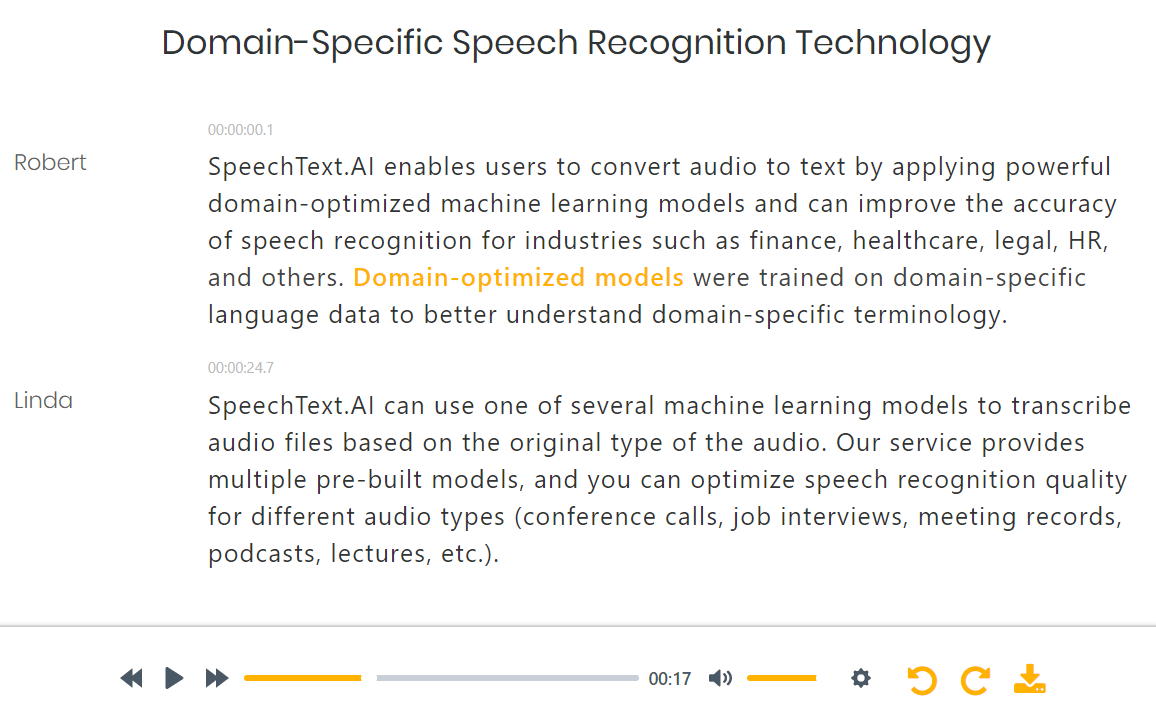
The first draft handles the typing. You handle the judgment. Play the recording as you edit, check speaker changes and make the small corrections that decide whether a transcript is merely readable or ready to share.
A raw block of text is only the beginning. SpeechText.AI brings recording settings, speaker labels, editing and export into one workflow, so you can get from source audio to a useful document.

Work with existing recordings, not just a live microphone. Convert spoken Telugu into editable Telugu text from interviews, voice notes and videos.

Keep Telugu projects alongside work in other languages. Select the actual spoken language for each recording rather than translating it by mistake.

Follow the conversation without guessing who is speaking. Speaker labels separate turns; review those labels when voices overlap or sound alike.

The engine offers domain models for fields such as finance, medicine and law. Use an available subject model to give specialist vocabulary more context.
A lecture is not a conference call. Choose the available audio-type setting for meetings, interviews, lectures or calls instead of treating every file the same.

Get sentences rather than an uninterrupted stream of words. Review punctuation against the speaker's meaning, especially in long or fast-spoken passages.

Replay unclear sections, find a phrase and correct the text in your browser. No switching between a media player and a separate document.

Export DOCX or PDF for sharing and editing. Choose SRT or VTT when the next stop is a video editor or caption track.
Model and recording-type options depend on the selected language. Choose from the settings shown for Telugu in your account.
A close-mic interview and a noisy conference call are different jobs. So are a carefully delivered lecture and a fast conversation that moves between Telugu and English. Give the engine clear audio and the right settings, then judge the result against your actual speakers.
Start with a short, representative excerpt before processing a large archive. Include the tricky parts: local expressions, unfamiliar names and a change of speaker. That's a more useful test than a headline percentage.
Telangana, Coastal Andhra and Rayalaseema bring different speech patterns and vocabulary. Check local expressions and word endings rather than assuming one sample represents every Telugu speaker.
For mostly Telugu audio, select Telugu. Review English product names, initials and longer English passages separately. Keep a consistent spelling for people, places and technical terms throughout the document.
Recheck dates, amounts, phone numbers and quotations against the recording. For medical or legal work, have a qualified professional verify the transcript before it is used for a decision or official record.
Interview quotes, lecture notes, meeting records and captions. Start with the recording, then choose the output your next task needs.
Separate speaker turns and check Telugu quotations before using them in an article, study or report.
Interview transcription guideCreate a written record you can search for decisions, dates and commitments. Use it as source material for meeting minutes.
Convert a meeting recordingTurn recorded Telugu lessons into text students can review alongside the audio. Check subject terms before sharing.
Voice-to-text workflowPublish a reviewed Telugu episode transcript, pull accurate quotes or use the text while writing show notes.
Podcast transcription guideExport Telugu SRT or VTT files, then check reading time and line breaks in your editor. Subtitle files are separate from the video.
Create subtitle filesGet a Word document from recorded spoken notes. Useful when an idea is easier to say in Telugu than type from scratch.
Convert MP3 to WordInterviews and business calls contain more than words. Review the data-handling terms, upload only recordings you have permission to process and manage your files from your account.
Data is transferred over a secure connection. Keep account access limited to the people authorized to work with your recordings.
SpeechText.AI's physical servers are located in the European Union, with GDPR-compliant personal-data handling.
The standard workflow uses AI speech recognition. It does not require a staff member to listen and manually type your recording.
Delete uploaded recordings and completed transcripts from your account dashboard when they are no longer needed.
Working with confidential or regulated material? Read the privacy policy and processing terms, then contact support@speechtext.ai about retention, access and your organization's requirements before uploading.
Telugu transcription plans start at US$9/month for 240 minutes. Plans extend to 2,700 minutes for larger interview collections and recurring work.
For regular Telugu interviews, lectures and voice recordings that need to become usable text.
From$9USD / month
Choose more minutes for recurring meetings, research projects or a busy publishing schedule.
Up to2,700transcription minutes
Prices shown in USD. Review the current plan details, trial allowance and limits in your account before purchase.
The practical answers, from mixed-language recordings to subtitle exports.
Ask the SpeechText.AI support teamCreate a SpeechText.AI account, upload your recording and select Telugu as the language. Choose the recording type and an available subject model, then start transcription. Review the result while listening to the audio and export your document or subtitles.
Select Telugu to transcribe Telugu speech into Telugu script. Transcription is not English translation, and it is not Latin-script transliteration. English translation is a separate task from the workflow described here.
SpeechText.AI's general accuracy claim is up to 99%; this is not a Telugu-specific benchmark or a guarantee for your recording. Background noise, regional speech, fast delivery, overlapping voices and unfamiliar terms affect the result. Test a representative excerpt and check the finished text against the audio.
Choose Telugu for recordings spoken mainly in Telugu. Review English passages, names, acronyms and local expressions separately. Test a short sample from your own speakers before processing a large batch. For long passages in another language, transcribe those passages using the appropriate language setting.
Yes. Upload a supported video such as MP4 or MOV, select Telugu and transcribe its audio. Review the text, then export SRT or VTT subtitles. Check caption timing and line breaks in your video editor before publishing.
Common uploads include MP3, WAV, M4A, MP4 and MOV. SpeechText.AI also supports other common audio and video formats. Download reviewed transcripts as DOCX or PDF, or use SRT and VTT for subtitles.
Yes. SpeechText.AI offers a free trial. Paid plans start at US$9 per month with 240 transcription minutes included. Check the trial allowance and current plan limits in your account before uploading a long recording.
SpeechText.AI uses a secure connection, EU-based server infrastructure and GDPR-compliant data handling. Transcription is automated, and you can delete recordings and transcripts from your account. Read the privacy policy and contact support about retention or sensitive-data requirements before uploading.
This page covers transcription of recorded audio and video files. It is not a live dictation keyboard. Record your voice with your preferred recorder, then upload the file for Telugu voice-to-text transcription.
SpeechText.AI provides a speech recognition API for apps and automated workflows. Check the API documentation for current Telugu language availability, model options and request parameters before integrating.
Choose a clear recording, set the language to Telugu and check the first result. Then put the rest of your audio to work.